symaware.simulators.carla package
Submodules
symaware.simulators.carla.abstraction module
- class symaware.simulators.carla.abstraction.Bounds(col_lb=0, col_ub=0, row_lb=0, row_ub=0)[source]
Bases:
object
- class symaware.simulators.carla.abstraction.GridAbstraction(grid_map, actions, state_repetition=1)[source]
-
A simple grid-based abstraction over a continuous space.
This class provides a grid representation of a continuous space, allowing for easy mapping between continuous positions and discrete grid cells. Each cell in the grid can be marked as occupied or free, and the grid can be positioned, rotated, and scaled in continuous space.
- property MDP: LightMDP
Get the MDP associated with the grid abstraction.
- Return type:
The LightMDP instance representing the MDP
- property action_names: tuple[_A]
Get the list of action names in the grid abstraction.
- Return type:
List of action identifiers
- property action_set
Get the set of available actions in the MDP.
- Return type:
Array of action identifiers
- additional_dimension_to_name(additional_dimension_idx, additional_dimension_value)[source]
Return the name corresponding to an additional dimension value.
- gen_labels(label_function)[source]
Generate state labels based on the provided label function.
Maps regions defined by Bounds to label strings and assigns labels to states that fall within those regions.
- Parameters:
label_function (
Callable[[int,GridAbstraction],str]) – Function that takes a state and the GridAbstraction, and returns a label string- Returns:
List of labels for each state, with “_” as default for unlabeled states
- gen_transitions()[source]
Generate the transition probability matrix for the MDP.
Computes transition probabilities for all state-action pairs based on the scenario-specific movement model.
- Returns:
3D transition matrix with shape (n_states, n_actions, n_states) where entry [i,j,k] represents P(s’=k | s=i, a=j)
- property grid_map: GridMap
Get the current grid map used in the abstraction.
- Return type:
The GridMap instance representing the grid
- property n_actions: int
Get the number of available actions in the grid abstraction.
- Return type:
Number of actions
- property n_states: int
Get the number of discrete states in the grid abstraction.
- Return type:
Number of states
- plot_labels(additional_dimension_to_plot=0, ax=None)[source]
Visualize the labels assigned to each state in the grid.
- Returns:
Matplotlib figure and axes containing the label visualization
- plot_transition_state(state, additional_dimension_to_plot=0)[source]
Visualize all the transition probabilities from a given state, across all actions.
- Parameters:
state (
int) – Current discrete state identifier
- plot_transitions_state_action(state, action, additional_dimension_to_plot=0, axes=None)[source]
Visualize the transition probabilities from a given state and action.
- property state_set
Get the set of discrete states in the grid abstraction.
- Return type:
Array of state identifiers
- abstractmethod transition_func(state, action)[source]
Compute transition probabilities from a given state and action.
- property transition_matrix: ndarray
Get the transition probability matrix for the MDP.
- Returns:
3D transition matrix with shape (n_states, n_actions, n_states)
where entry [i,j,k] represents P(s’=k | s=i, a=j)
- update(position=None, label_function=None)[source]
Update the MDP with a new initial state and labels.
- Parameters:
position (
tuple[float,float] |int|None, default:None) – New initial position as (x, y) coordinates or state index. Ignored if not providedlabel_function (
Optional[Callable[[int,GridAbstraction],str]], default:None) – Dictionary mapping Bounds regions to label strings. Ignored if not provided
- class symaware.simulators.carla.abstraction.KingGridAbstraction(grid_map)[source]
Bases:
GridAbstraction[tuple[int, int]]Implementation of the King grid movement model.
The King can move one square in any direction (horizontally, vertically, or diagonally). The probability of successful movement is 0.8, while the probability of ending up in any of the adjacent squares (including diagonals) is uniformly distributed over the remaining 0.2 probability. There is also the action of staying in place with probability 1.0.
The actions are represented as tuples (delta_velocity_x, delta_velocity_y), where each component can be -1, 0, or 1.

- class symaware.simulators.carla.abstraction.PathAbstraction(waypoints, actions, radius=2.0)[source]
Bases:
Generic[_A]Create an abstraction (a path) over a continuous space.
The path will be defined by a sequence of waypoints, each representing a discrete state in the continuous space. An MDP will be associated to the path, describing the probability of moving from one waypoint to the next based on the action taken.
- gen_labels(label_function)[source]
Generate state labels based on the provided label function.
Maps regions defined by Bounds to label strings and assigns labels to states that fall within those regions.
- gen_transitions()[source]
Generate the transition probability matrix for the MDP.
Computes transition probabilities for all state-action pairs based on the scenario-specific movement model.
- Returns:
3D transition matrix with shape (n_states, n_actions, n_states) where entry [i,j,k] represents P(s’=k | s=i, a=j)
- class symaware.simulators.carla.abstraction.PathGridAbstraction(grid_map, max_speed, speed_res=1.0, initial_state=(0.0, 0.0, 0.0), label_function=None)[source]
Bases:
SpeedGridAbstraction[tuple[int, int]]- _grid_map: PathsGridMap
- gen_transitions()[source]
Generate the transition probability matrix for the MDP.
Computes transition probabilities for all state-action pairs based on the scenario-specific movement model.
- Returns:
3D transition matrix with shape (n_states, n_actions, n_states) where entry [i,j,k] represents P(s’=k | s=i, a=j)
- class symaware.simulators.carla.abstraction.SpeedGridAbstraction(grid_map, max_speed, actions, speed_res=1.0, initial_state=(0.0, 0.0, 0.0), label_function=None)[source]
Bases:
GridAbstraction[_A]A grid-based abstraction that incorporates velocity into the state representation.
This class extends the GridAbstraction to include velocity components in the state representation. The actions are represented as tuples (delta_movement, delta_speed), where each component can be -1, 0, or 1.
Movement Model: - The agent can move left (-1), forward (0), or right (1) with specified probabilities. - The speed can decrease (-1), remain the same (0), or increase (1) with specified probabilities.
In this case, the state representation is assumed to be a combination of position and velocity.
- _cell_speed_to_state(cell, speed_idx)[source]
Convert grid cell coordinates and speed index to a discrete state identifier.
- _state_to_speed_idx(state)[source]
Convert a discrete state to its corresponding speed index.
- Parameters:
state (
int) – Discrete state identifier- Returns:
int– Grid cell coordinates as (column, row) indices- Raises:
AssertionError – If the state identifier is invalid:
- additional_dimension_to_name(additional_dimension_idx)[source]
Return the name corresponding to an additional dimension value.
- cell_speed_idx_to_pos_speed(cell, speed_idx)[source]
Convert grid cell coordinates and speed index to continuous position and speed.
- property max_speed: float
Get the maximum speed represented in the abstraction.
- Return type:
Maximum speed value
- pos_speed_to_state(position, speed)[source]
Convert a continuous position and speed to the corresponding abstract state.
- property speed_range: int
Get the number of discrete speed levels in the abstraction.
- Return type:
Number of speed levels
- property speed_resolution: float
Get the speed resolution used in the abstraction.
- Return type:
Speed resolution value
- state_to_pos_speed(state)[source]
Convert a discrete state identifier to continuous position and speed.
- state_to_speed(state)[source]
Convert a discrete grid state to a continuous speed.
- Parameters:
state (
int) – Discrete state identifier- Returns:
float– Continuous speed value- Raises:
AssertionError – If the state identifier is invalid:
- update(pos_speed=None, label_function=None)[source]
Update the MDP with a new initial state and labels.
- Parameters:
pos_speed (
tuple[float,float,float] |int|None, default:None) – New initial position as (x, y) coordinates and speed (z) or direct state index. Ignored if not providedlabel_function (
Optional[Callable[[int,GridAbstraction],str]], default:None) – Dictionary mapping Bounds regions to label strings. Ignored if not provided
- class symaware.simulators.carla.abstraction.VelocityGridAbstraction(grid_map, max_speed, speed_res=1.0, initial_state=(0.0, 0.0, 0.0), label_function=None)[source]
Bases:
SpeedGridAbstraction[tuple[SteerAction, SpeedAction]]A grid-based abstraction that incorporates velocity into the state representation.
This class extends the GridAbstraction to include velocity components in the state representation. The actions are represented as tuples (delta_movement, delta_speed), where each component can be -1, 0, or 1.
Movement Model: - The agent can move left (-1), forward (0), or right (1) with specified probabilities. - The speed can decrease (-1), remain the same (0), or increase (1) with specified probabilities.
In this case, the state representation is assumed to be a combination of position and velocity.
symaware.simulators.carla.controllers module
- class symaware.simulators.carla.controllers.CarlaController(agent_id, async_loop_lock=None)[source]
Bases:
Controller- initialise_component(agent, initial_awareness_database, initial_knowledge_database)[source]
Initialize the component with some custom logic. For example you can instantiate new attributes and properties of the component. This function is called upon initialization by the
Agent. To get the agent’s initial awareness and knowledge database you can use the arguments of this function. Make sure to call the super method at the end of your implementation to notify the subscribers of the event.Note
Invoking this method will notify the subscribers of the event
initialisedadded withadd_on_initialised().Warning
The implementation of the method in
Componentnotifies the subscribers of the eventinitialised, sets the attribute_agentto the agent passed as argument and the flag_initialisedtoTrue. If you override this method, make sure to call the super method at the end of your implementation.Example
The
initialise_component()method can be overwritten to provide some custom initialisation logic.>>> import time >>> import numpy as np >>> from symaware.base import Component >>> class MyComponent(Component): ... def initialise_component( ... self, agent, initial_awareness_database, initial_knowledge_database ... ): ... self._my_model = agent.entity.model ... self._my_state = initial_awareness_database[self.agent_id].state ... self._my_time = time.time() ... self._my_list = [] ... super().initialise_component(entity, initial_awareness_database, initial_knowledge_database)
- Parameters:
agent – Agent this component has been attached to
initial_awareness_database – Awareness database of the agent
initial_knowledge_database – Knowledge database of the agent
- class symaware.simulators.carla.controllers.GridAbstractionController(agent_id, grid_map, policy_file='', async_loop_lock=None)[source]
Bases:
Controller- initialise_component(agent, initial_awareness_database, initial_knowledge_database)[source]
Initialize the component with some custom logic. For example you can instantiate new attributes and properties of the component. This function is called upon initialization by the
Agent. To get the agent’s initial awareness and knowledge database you can use the arguments of this function. Make sure to call the super method at the end of your implementation to notify the subscribers of the event.Note
Invoking this method will notify the subscribers of the event
initialisedadded withadd_on_initialised().Warning
The implementation of the method in
Componentnotifies the subscribers of the eventinitialised, sets the attribute_agentto the agent passed as argument and the flag_initialisedtoTrue. If you override this method, make sure to call the super method at the end of your implementation.Example
The
initialise_component()method can be overwritten to provide some custom initialisation logic.>>> import time >>> import numpy as np >>> from symaware.base import Component >>> class MyComponent(Component): ... def initialise_component( ... self, agent, initial_awareness_database, initial_knowledge_database ... ): ... self._my_model = agent.entity.model ... self._my_state = initial_awareness_database[self.agent_id].state ... self._my_time = time.time() ... self._my_list = [] ... super().initialise_component(entity, initial_awareness_database, initial_knowledge_database)
- Parameters:
agent – Agent this component has been attached to
initial_awareness_database – Awareness database of the agent
initial_knowledge_database – Knowledge database of the agent
- class symaware.simulators.carla.controllers.MPController(agent_id, time_step=-1, wheel_base=1.5, horizon_steps=5, async_loop_lock=None)[source]
Bases:
CarlaController- _compute()[source]
Compute the control input for the agent. Normally the agent would use its information available at a certain time to compute a control input. This could translate in a lot of information being passed to this method.
This method must be implemented in any custom controller.
Example
Create a new controller by subclassing the
Controllerand implementing the_compute()method and the_update()method.>>> from symaware.base import Controller, MultiAgentAwarenessVector, MultiAgentKnowledgeDatabase, TimeSeries >>> import numpy as np >>> class MyController(Controller): ... def _compute(self) -> "tuple[np.ndarray, TimeSeries]": ... # Your implementation here ... # Example: ... # Get the state of the agent ... state = self._agent.self_state ... # Get the goal position from the knowledge database ... goal_pos = self._agent.self_knowledge["goal_pos"] ... # Compute the control input as the difference between the goal position and the current state ... control_input = goal_pos - state ... # Return the control input and an empty TimeSeries ... return control_input, TimeSeries() ... ... def _update(self, control_input_and_intent: "tuple[np.ndarray, TimeSeries]"): ... # Your implementation here ... # Example: ... # Simply override the control input and intent of the agent ... control_input, intent = control_input_and_intent ... self._agent.model.control_input = control_input ... self._agent.self_awareness.intent = intent
- Returns:
New state of the agent the controller wants to reach,
Time series of intents of the controller, Can be empty
- initialise_component(agent, initial_awareness_database, initial_knowledge_database)[source]
Initialize the component with some custom logic. For example you can instantiate new attributes and properties of the component. This function is called upon initialization by the
Agent. To get the agent’s initial awareness and knowledge database you can use the arguments of this function. Make sure to call the super method at the end of your implementation to notify the subscribers of the event.Note
Invoking this method will notify the subscribers of the event
initialisedadded withadd_on_initialised().Warning
The implementation of the method in
Componentnotifies the subscribers of the eventinitialised, sets the attribute_agentto the agent passed as argument and the flag_initialisedtoTrue. If you override this method, make sure to call the super method at the end of your implementation.Example
The
initialise_component()method can be overwritten to provide some custom initialisation logic.>>> import time >>> import numpy as np >>> from symaware.base import Component >>> class MyComponent(Component): ... def initialise_component( ... self, agent, initial_awareness_database, initial_knowledge_database ... ): ... self._my_model = agent.entity.model ... self._my_state = initial_awareness_database[self.agent_id].state ... self._my_time = time.time() ... self._my_list = [] ... super().initialise_component(entity, initial_awareness_database, initial_knowledge_database)
- Parameters:
agent – Agent this component has been attached to
initial_awareness_database – Awareness database of the agent
initial_knowledge_database – Knowledge database of the agent
- run_step(current_state, target_ref)[source]
Solve the MPC optimization problem. The current state is composed as follows:
$$ [x, y, phi, v] $$
where $x, y$ are the position coordinates, $phi$ is the heading angle, and $v$ is the velocity. On the other hand, the target reference is composed as follows:
$$ [x_t, y_t, v_t] $$
where $x_t, y_t$ are the target position coordinates, and $v_t$ is the target velocity.
- class symaware.simulators.carla.controllers.PIDLateralController(offset=0, K_P=1.0, K_I=0.1, K_D=0.1, dt=0.03)[source]
Bases:
objectPIDLateralController implements lateral control using a PID.
- _pid_control(waypoint, vehicle_transform)[source]
Estimate the steering angle of the vehicle based on the PID equations
- class symaware.simulators.carla.controllers.PIDLongitudinalController(K_P=1.0, K_I=0.1, K_D=0.1, dt=0.03)[source]
Bases:
objectPIDLongitudinalController implements longitudinal control using a PID.
- _pid_control(target_speed, current_speed)[source]
Estimate the throttle/brake of the vehicle based on the PID equations
- class symaware.simulators.carla.controllers.PPController(agent_id, lookahead_distance=2.0, wheel_base=2.5, default_speed=1.0, max_steering=0.8, async_loop_lock=None)[source]
Bases:
CarlaControllerPPController implements a Pure Pursuit controller for path following. It computes the necessary speed and steering angle to follow a path.
- class symaware.simulators.carla.controllers.PathGridAbstractionController(agent_id, grid_map, async_loop_lock=None)[source]
Bases:
Controller- __LOGGER = <Logger symaware.simulators.carla.PathGridAbstractionController (WARNING)>
- property abstraction: PathGridAbstraction
- initialise_component(agent, initial_awareness_database, initial_knowledge_database)[source]
Initialize the component with some custom logic. For example you can instantiate new attributes and properties of the component. This function is called upon initialization by the
Agent. To get the agent’s initial awareness and knowledge database you can use the arguments of this function. Make sure to call the super method at the end of your implementation to notify the subscribers of the event.Note
Invoking this method will notify the subscribers of the event
initialisedadded withadd_on_initialised().Warning
The implementation of the method in
Componentnotifies the subscribers of the eventinitialised, sets the attribute_agentto the agent passed as argument and the flag_initialisedtoTrue. If you override this method, make sure to call the super method at the end of your implementation.Example
The
initialise_component()method can be overwritten to provide some custom initialisation logic.>>> import time >>> import numpy as np >>> from symaware.base import Component >>> class MyComponent(Component): ... def initialise_component( ... self, agent, initial_awareness_database, initial_knowledge_database ... ): ... self._my_model = agent.entity.model ... self._my_state = initial_awareness_database[self.agent_id].state ... self._my_time = time.time() ... self._my_list = [] ... super().initialise_component(entity, initial_awareness_database, initial_knowledge_database)
- Parameters:
agent – Agent this component has been attached to
initial_awareness_database – Awareness database of the agent
initial_knowledge_database – Knowledge database of the agent
- property lp: VelocityLPRiskLTL
- class symaware.simulators.carla.controllers.VehiclePIDController(agent_id, args_lateral={'K_D': 0.0, 'K_I': 0.0, 'K_P': 2.0}, args_longitudinal={'K_D': 0.0, 'K_I': 0.0, 'K_P': 2.0}, offset=0, max_throttle=0.75, max_brake=0.3, max_steering=0.8, async_loop_lock=None)[source]
Bases:
CarlaControllerVehiclePIDController is the combination of two PID controllers (lateral and longitudinal) to perform the low level control a vehicle from client side
- _compute()[source]
Compute the control input for the agent. Normally the agent would use its information available at a certain time to compute a control input. This could translate in a lot of information being passed to this method.
This method must be implemented in any custom controller.
Example
Create a new controller by subclassing the
Controllerand implementing the_compute()method and the_update()method.>>> from symaware.base import Controller, MultiAgentAwarenessVector, MultiAgentKnowledgeDatabase, TimeSeries >>> import numpy as np >>> class MyController(Controller): ... def _compute(self) -> "tuple[np.ndarray, TimeSeries]": ... # Your implementation here ... # Example: ... # Get the state of the agent ... state = self._agent.self_state ... # Get the goal position from the knowledge database ... goal_pos = self._agent.self_knowledge["goal_pos"] ... # Compute the control input as the difference between the goal position and the current state ... control_input = goal_pos - state ... # Return the control input and an empty TimeSeries ... return control_input, TimeSeries() ... ... def _update(self, control_input_and_intent: "tuple[np.ndarray, TimeSeries]"): ... # Your implementation here ... # Example: ... # Simply override the control input and intent of the agent ... control_input, intent = control_input_and_intent ... self._agent.model.control_input = control_input ... self._agent.self_awareness.intent = intent
- Returns:
New state of the agent the controller wants to reach,
Time series of intents of the controller, Can be empty
- change_longitudinal_PID(args_longitudinal)[source]
Changes the parameters of the PIDLongitudinalController
- initialise_component(agent, initial_awareness_database, initial_knowledge_database)[source]
Initialize the component with some custom logic. For example you can instantiate new attributes and properties of the component. This function is called upon initialization by the
Agent. To get the agent’s initial awareness and knowledge database you can use the arguments of this function. Make sure to call the super method at the end of your implementation to notify the subscribers of the event.Note
Invoking this method will notify the subscribers of the event
initialisedadded withadd_on_initialised().Warning
The implementation of the method in
Componentnotifies the subscribers of the eventinitialised, sets the attribute_agentto the agent passed as argument and the flag_initialisedtoTrue. If you override this method, make sure to call the super method at the end of your implementation.Example
The
initialise_component()method can be overwritten to provide some custom initialisation logic.>>> import time >>> import numpy as np >>> from symaware.base import Component >>> class MyComponent(Component): ... def initialise_component( ... self, agent, initial_awareness_database, initial_knowledge_database ... ): ... self._my_model = agent.entity.model ... self._my_state = initial_awareness_database[self.agent_id].state ... self._my_time = time.time() ... self._my_list = [] ... super().initialise_component(entity, initial_awareness_database, initial_knowledge_database)
- Parameters:
agent – Agent this component has been attached to
initial_awareness_database – Awareness database of the agent
initial_knowledge_database – Knowledge database of the agent
symaware.simulators.carla.dynamical_model module
- class symaware.simulators.carla.dynamical_model.DynamicalModel(ID, control_input)[source]
Bases:
DynamicalModel,Generic[T]Abstract class for dynamical models using the CARLA simulation engine.
This is the parent class for all CARLA-based dynamical models. Subclasses implement specific models for different entity types (vehicles, walkers, etc.) and control input formats.
- Parameters:
- _actor: T
- class symaware.simulators.carla.dynamical_model.RawDynamicalModel(agent_id)[source]
Bases:
DynamicalModel[Actor]Raw dynamical model for entities.
Allows setting the position and orientation of an entity directly. Takes a control input of six elements: x, y, z position and yaw, pitch, roll rotations.
- control_input_to_array(x, y, z, yaw, pitch, roll)[source]
Convert position and rotation values to array.
- Returns:
ndarray– Array with [x, y, z, yaw, pitch, roll]
- set_control_input(x, y, z, yaw, pitch, roll)[source]
Set the control input with position and rotation values.
- step()[source]
Run a simulation step of the dynamical model. Called by the associated entity at each simulation step.
- Parameters:
args – Additional arguments
kwargs – Additional keyword arguments
- property subinputs_dict: RawModelSubinputs
The input of a system is the composition of subinputs.
Example
A car input [vx, vy, vz, s] is composed by the velocity and the steering angle.
>>> from symaware.base import DynamicalModel
>>> class CarModel(DynamicalModel):
...     @property
...     def subinputs_dict(self):
...         return {
...             "velocity": self._control_input[:3],
...             "steering_angle": self._control_input[3]
...         }
...
Important
The order of the subinputs in the list must be the same as the order of the subinputs in the input vector
- class symaware.simulators.carla.dynamical_model.StillDynamicalModel(agent_id)[source]
Bases:
DynamicalModel[Actor]A static dynamical model for entities that do not move. This model takes no control inputs and keeps the entity stationary.
- property subinputs_dict: RawModelSubinputs
The input of a system is the composition of subinputs.
Example
A car input [vx, vy, vz, s] is composed by the velocity and the steering angle.
>>> from symaware.base import DynamicalModel
>>> class CarModel(DynamicalModel):
...     @property
...     def subinputs_dict(self):
...         return {
...             "velocity": self._control_input[:3],
...             "steering_angle": self._control_input[3]
...         }
...
Important
The order of the subinputs in the list must be the same as the order of the subinputs in the input vector
- class symaware.simulators.carla.dynamical_model.VehicleControlModel(agent_id)[source]
Bases:
DynamicalModel[Vehicle]A simple model that uses the built-in vehicle control mechanism of CARLA.
- control_input_to_array(steer=0.0, brake=0.0, hand_brake=False, reverse=False, manual_gear_shift=False, gear=0)[source]
- Overloads:
self, throttle (float), steer (float), brake (float), hand_brake (bool), reverse (bool), manual_gear_shift (bool), gear (int) → np.ndarray
self, throttle (carla.VehicleControl) → np.ndarray
Convert vehicle control parameters to array representation.
- Returns:
Array with [throttle, steer, brake, hand_brake, reverse, manual_gear_shift, gear]
- set_control_input(throttle=0.0, steer=0.0, brake=0.0, hand_brake=False, reverse=False, manual_gear_shift=False, gear=0)[source]
- Overloads:
self, throttle (float), steer (float), brake (float), hand_brake (bool), reverse (bool), manual_gear_shift (bool), gear (int) → np.ndarray
self, throttle (carla.VehicleControl) → np.ndarray
Set the vehicle control inputs.
This method supports two calling conventions: individual parameters or a carla.VehicleControl object.
- Parameters:
throttle (default:
0.0) – Throttle value (0-1) or a VehicleControl objectsteer (default:
0.0) – Steering angle (-1 to 1)brake (default:
0.0) – Brake value (0-1)hand_brake (default:
False) – Hand brake flagreverse (default:
False) – Reverse flagmanual_gear_shift (default:
False) – Manual gear shift flaggear (default:
0) – Gear number
- step()[source]
Run a simulation step of the dynamical model. Called by the associated entity at each simulation step.
- Parameters:
args – Additional arguments
kwargs – Additional keyword arguments
- property subinputs_dict: VehicleControlSubinputs
The input of a system is the composition of subinputs.
Example
A car input [vx, vy, vz, s] is composed by the velocity and the steering angle.
>>> from symaware.base import DynamicalModel
>>> class CarModel(DynamicalModel):
...     @property
...     def subinputs_dict(self):
...         return {
...             "velocity": self._control_input[:3],
...             "steering_angle": self._control_input[3]
...         }
...
Important
The order of the subinputs in the list must be the same as the order of the subinputs in the input vector
- class symaware.simulators.carla.dynamical_model.VehicleDynamicalModel(agent_id)[source]
Bases:
DynamicalModel[Vehicle]Velocity-based dynamical model for vehicle entities.
Allows setting the target velocity of the vehicle directly. Takes a control input of three elements: x, y, z velocity components.
- control_input_to_array(x, y, z)[source]
Convert velocity values to array.
- Returns:
ndarray– Array with [x, y, z] velocity components
- step()[source]
Run a simulation step of the dynamical model. Called by the associated entity at each simulation step.
- Parameters:
args – Additional arguments
kwargs – Additional keyword arguments
- property subinputs_dict: VelocitySubinputs
The input of a system is the composition of subinputs.
Example
A car input [vx, vy, vz, s] is composed by the velocity and the steering angle.
>>> from symaware.base import DynamicalModel
>>> class CarModel(DynamicalModel):
...     @property
...     def subinputs_dict(self):
...         return {
...             "velocity": self._control_input[:3],
...             "steering_angle": self._control_input[3]
...         }
...
Important
The order of the subinputs in the list must be the same as the order of the subinputs in the input vector
- class symaware.simulators.carla.dynamical_model.VelocityDynamicalModel(agent_id)[source]
Bases:
DynamicalModel[Actor]Velocity-based dynamical model for entities.
Allows setting the target velocity of an entity directly. Takes a control input of three elements: x, y, z velocity components.
- control_input_to_array(x, y, z)[source]
Convert velocity values to array.
- Returns:
ndarray– Array with [x, y, z] velocity components
- step()[source]
Run a simulation step of the dynamical model. Called by the associated entity at each simulation step.
- Parameters:
args – Additional arguments
kwargs – Additional keyword arguments
- property subinputs_dict: VelocitySubinputs
The input of a system is the composition of subinputs.
Example
A car input [vx, vy, vz, s] is composed by the velocity and the steering angle.
>>> from symaware.base import DynamicalModel
>>> class CarModel(DynamicalModel):
...     @property
...     def subinputs_dict(self):
...         return {
...             "velocity": self._control_input[:3],
...             "steering_angle": self._control_input[3]
...         }
...
Important
The order of the subinputs in the list must be the same as the order of the subinputs in the input vector
- class symaware.simulators.carla.dynamical_model.WalkDynamicalModel(agent_id=-1, speed=1.0, direction=-1.0, jump=False)[source]
Bases:
DynamicalModel[Walker]Dynamical model for walker entities in CARLA. This model controls walker movement using speed, direction, and jump parameters. The walker moves continuously in the specified direction at the given speed.
- control_input_to_array()[source]
Convert control input to array representation (empty for walker model).
- Return type:
- initialise(actor)[source]
Initialize the dynamical model with a CARLA actor.
- Parameters:
actor (
Walker) – The CARLA actor to associate with this dynamical model
- property subinputs_dict: RawModelSubinputs
Dictionary of named control inputs (empty for walker model).
symaware.simulators.carla.entities module
- class symaware.simulators.carla.entities.CameraEntity(id=-1, model=<factory>, actor_id=-1, kind='sensor.camera.rgb', actor=None, position=<factory>, velocity=<factory>, rotation=<factory>, acceleration=<factory>, pre_existing=False, kwargs=<factory>, cbs=<factory>, callback=None)[source]
Bases:
SensorEntityCamera sensor entity for CARLA simulation.
Represents a camera sensor that captures RGB images from the simulation. All internal identifiers are set to -1 by default and will be set to the correct values during initialisation.
- Parameters:
position (
ndarray, default:<factory>) – (3)-shaped initial position of the entity. If the size is less than 3, missing values are set to 0velocity (
ndarray, default:<factory>) – (3)-shaped initial velocity of the entity. If the size is less than 3, missing values are set to 0rotation (
ndarray, default:<factory>) – (3)-shaped initial orientation of the entity as Euler anglesmodel (
DynamicalModel, default:<factory>) – Dynamical model associated with the entity. Must be a subclass of DynamicalModel
- actor: carla.Sensor = None
- class symaware.simulators.carla.entities.Entity(id=-1, model=<factory>, actor_id=-1, kind='', actor=None, position=<factory>, velocity=<factory>, rotation=<factory>, acceleration=<factory>, pre_existing=False, kwargs=<factory>)[source]
Bases:
EntityAbstract class for CARLA entities in the simulation.
Represents an actor in the CARLA simulation environment. All internal identifiers are set to -1 by default and will be set to the correct values during initialisation.
- Parameters:
position (
ndarray, default:<factory>) – (3)-shaped initial position of the entity. If the size is less than 3, missing values are set to 0velocity (
ndarray, default:<factory>) – (3)-shaped initial velocity of the entity. If the size is less than 3, missing values are set to 0rotation (
ndarray, default:<factory>) – (3)-shaped initial orientation of the entity as Euler anglesmodel (
DynamicalModel, default:<factory>) – Dynamical model associated with the entity. Must be a subclass of DynamicalModel
- actor: carla.Actor = None
- property direction: carla.Vector3D
Get the direction of the entity as a numpy array. The direction is defined as the orientation of the entity.
- Return type:
Vector representing the direction the entity is facing.
- initialise(world, parent=None)[source]
Initialise the entity in the world. This method should be called after the entity is created. It sets the actor_id of the entity and the actor associated with it.
- Parameters:
world (
World) – The world in which the entity is created.
- property location: carla.Location
Get the location of the entity as a carla.Location object.
- Return type:
Location of the entity
- model: DynamicalModel
- property state
Get the state of the entity as a numpy array. The state is defined as the position and orientation of the entity.
- Return type:
(3 + 3 + 3)-shaped array containing the position, orientation and velocity of the entity.
- class symaware.simulators.carla.entities.PedestrianEntity(id=-1, model=<factory>, actor_id=-1, kind='walker.pedestrian.0038', actor=None, position=<factory>, velocity=<factory>, rotation=<factory>, acceleration=<factory>, pre_existing=False, kwargs=<factory>)[source]
Bases:
EntityPedestrian entity for CARLA simulation.
Represents a pedestrian (walker) actor in the CARLA simulation environment. All internal identifiers are set to -1 by default and will be set to the correct values during initialisation.
- Parameters:
position (
ndarray, default:<factory>) – (3)-shaped initial position of the entity. If the size is less than 3, missing values are set to 0velocity (
ndarray, default:<factory>) – (3)-shaped initial velocity of the entity. If the size is less than 3, missing values are set to 0rotation (
ndarray, default:<factory>) – (3)-shaped initial orientation of the entity as Euler anglesmodel (
DynamicalModel, default:<factory>) – Dynamical model associated with the entity. Must be a subclass of DynamicalModel
- class symaware.simulators.carla.entities.SensorEntity(id=-1, model=<factory>, actor_id=-1, kind='', actor=None, position=<factory>, velocity=<factory>, rotation=<factory>, acceleration=<factory>, pre_existing=False, kwargs=<factory>, cbs=<factory>)[source]
Bases:
EntityAbstract base class for sensor entities in CARLA.
Represents sensors (cameras, lidar, etc.) in the CARLA simulation. All internal identifiers are set to -1 by default and will be set to the correct values during initialisation.
- Parameters:
position (
ndarray, default:<factory>) – (3)-shaped initial position of the entity. If the size is less than 3, missing values are set to 0velocity (
ndarray, default:<factory>) – (3)-shaped initial velocity of the entity. If the size is less than 3, missing values are set to 0rotation (
ndarray, default:<factory>) – (3)-shaped initial orientation of the entity as Euler anglesmodel (
DynamicalModel, default:<factory>) – Dynamical model associated with the entity. Must be a subclass of DynamicalModel
- actor: carla.Sensor = None
- class symaware.simulators.carla.entities.SpectatorEntity(id=-1, model=<factory>, actor_id=-1, kind='', actor=None, position=<factory>, velocity=<factory>, rotation=<factory>, acceleration=<factory>, pre_existing=False, kwargs=<factory>, parent=None, following=False)[source]
Bases:
EntitySpectator camera entity for CARLA simulation.
Provides a special viewport to view the simulation from a detached perspective. All internal identifiers are set to -1 by default and will be set to the correct values during initialisation.
- Parameters:
position (
ndarray, default:<factory>) – (3)-shaped initial position of the entity. If the size is less than 3, missing values are set to 0velocity (
ndarray, default:<factory>) – (3)-shaped initial velocity of the entity. If the size is less than 3, missing values are set to 0rotation (
ndarray, default:<factory>) – (3)-shaped initial orientation of the entity as Euler anglesmodel (
DynamicalModel, default:<factory>) – Dynamical model associated with the entity. Must be a subclass of DynamicalModel
- initialise(world, parent=None)[source]
Initialise the entity in the world. This method should be called after the entity is created. It sets the actor_id of the entity and the actor associated with it.
- Parameters:
world – The world in which the entity is created.
- parent: carla.Actor = None
- class symaware.simulators.carla.entities.VehicleEntity(id=-1, model=<factory>, actor_id=-1, kind='vehicle.tesla.model3', actor=None, position=<factory>, velocity=<factory>, rotation=<factory>, acceleration=<factory>, pre_existing=False, kwargs=<factory>, color='255, 0, 0', autopilot=False, gravity=False, sensors=<factory>, wheel_base=0.0)[source]
Bases:
EntityVehicle entity for CARLA simulation.
Represents a vehicle actor in the CARLA simulation environment. All internal identifiers are set to -1 by default and will be set to the correct values during initialisation.
- Parameters:
position (
ndarray, default:<factory>) – (3)-shaped initial position of the entity. If the size is less than 3, missing values are set to 0velocity (
ndarray, default:<factory>) – (3)-shaped initial velocity of the entity. If the size is less than 3, missing values are set to 0rotation (
ndarray, default:<factory>) – (3)-shaped initial orientation of the entity as Euler anglesmodel (
DynamicalModel, default:<factory>) – Dynamical model associated with the entity. Must be a subclass of DynamicalModel
- actor: carla.Vehicle = None
- initialise(world, parent=None)[source]
Initialise the entity in the world. This method should be called after the entity is created. It sets the actor_id of the entity and the actor associated with it.
- Parameters:
world – The world in which the entity is created.
- property state
Get the state of the entity as a numpy array. The state is defined as the position and orientation of the entity.
- Returns:
(3 + 3 + 3)-shaped array containing the position (m), orientation (rad) and velocity (m/s**2) of the entity.
- Return type:
np.ndarray
- class symaware.simulators.carla.entities.WarningSignEntity(id=-1, model=<factory>, actor_id=-1, kind='static.prop.trafficwarning', actor=None, position=<factory>, velocity=<factory>, rotation=<factory>, acceleration=<factory>, pre_existing=False, kwargs=<factory>)[source]
Bases:
EntityWarning sign entity for CARLA simulation.
Represents a warning sign or static object in the CARLA simulation environment. All internal identifiers are set to -1 by default and will be set to the correct values during initialisation.
- Parameters:
position (
ndarray, default:<factory>) – (3)-shaped initial position of the entity. If the size is less than 3, missing values are set to 0velocity (
ndarray, default:<factory>) – (3)-shaped initial velocity of the entity. If the size is less than 3, missing values are set to 0rotation (
ndarray, default:<factory>) – (3)-shaped initial orientation of the entity as Euler anglesmodel (
DynamicalModel, default:<factory>) – Dynamical model associated with the entity. Must be a subclass of DynamicalModel
symaware.simulators.carla.environment module
- class symaware.simulators.carla.environment.Environment(host='127.0.0.1', port=2000, connection_timeout=5000, map='Town01', spectator=False, render=True, time_interval=0.0, async_loop_lock=None)[source]
Bases:
EnvironmentEnvironment based on the carla simulator.
- Parameters:
real_time_interval – If set to a strictly positive value, pybullet will run the simulation in real time. Otherwise, the simulation will run when
step()is called.connection_method – Method used to connect to the pybullet server. See the pybullet documentation for more information.
plane_scaling – Scale of the plane automatically added to the environment to represent the ground. If set to a non positive value, the plane will not be added.
gravity – Set the gravity the physics engine will apply at each simulation step. It can be a single floating point value, in which case it will be applied along the third axis, or a tuple of three values, one for each axis.
async_loop_lock (
AsyncLoopLock|None, default:None) – Async loop lock to use for the environment
- __LOGGER = <Logger symaware.simulators.carla.carla.Environment (WARNING)>
- _add_entity(entity)[source]
Add an entity to the environment.
- Parameters:
entity (
Entity) – The entity to add
- add_gizmo(gizmo)[source]
Add a gizmo (visualization) to the environment.
- Parameters:
gizmo (
Gizmo) – The gizmo to add
- get_agent_direction(agent)[source]
Get the direction of an agent in the environment. The actual implementation should be done in the derived class, based on the simulated environment API.
- get_entity_direction(entity)[source]
Get the direction vector of an entity.
- Parameters:
entity (
Entity) – The entity to get the direction of- Returns:
Vector3D– Direction vector of the entity
- get_entity_location(entity)[source]
Get the location of an entity.
- Parameters:
entity (
Entity) – The entity to get the location of- Returns:
Location– Location of the entity
- get_waypoints(distance=5.0)[source]
Get all the waypoints in the current map.
- Returns:
list[Waypoint] – List of waypoints in the current map
- initialise()[source]
Initialise the simulation, allocating the required resources. Should be called when the simulation has been set up and is ready to be run. Some environment implementations may call it automatically when the environment is created. It is their responsibility to ensure that the method is idempotent.
- property spectator: carla.Actor
Get the spectator of the world. The spectator is a special actor that can be used to view the world from a different perspective.
- step()[source]
It can be called repeatedly step the environment forward in time, updating the state of all the entities.
- stop()[source]
Terminate the simulation, releasing the resources. Should be called when the simulation has been running manually and needs to be stopped. Some environment implementations may call it automatically when the environment is destroyed. It is their responsibility to ensure that the method is idempotent.
Warning
Depending on the simulator implementation, calling this method may invalidate all the entities previously added to the environment. In that case, entities and the environment should be recreated from scratch.
- property world: carla.World
Get the carla world. The world is the main object that contains all the actors and the environment.
symaware.simulators.carla.gizmo module
- class symaware.simulators.carla.gizmo.Gizmo(color=<factory>, thickness=0.06, life_time=1.0)[source]
Bases:
ABCAbstract base class for debug visualization gizmos in CARLA.
Gizmos are used to display debug information in the CARLA simulator such as points, grids, paths, and other geometric shapes.
- color: carla.Color
- abstractmethod draw(world)[source]
Draw the gizmo in the world.
- Parameters:
world (
World) – The CARLA world to draw the gizmo in
- class symaware.simulators.carla.gizmo.GridGizmo(color=<factory>, thickness=0.06, life_time=1.0, origin=<factory>, shape=(1, 1), cell_size=(1.0, 1.0))[source]
Bases:
GizmoA gizmo that draws a regular grid.
Displays a grid of boxes with the specified origin, shape, and cell size.
- draw(world)[source]
Draw the gizmo in the world.
- Parameters:
world (
World) – The CARLA world to draw the gizmo in
- origin: carla.Location
- class symaware.simulators.carla.gizmo.GridMapGizmo(color=<factory>, thickness=0.09, life_time=1.0, grid_map=None, z=0.0, draw_pos=False)[source]
Bases:
GizmoA gizmo that draws a GridMap visualization.
Displays an occupancy grid map with cells colored based on occupancy status. Optionally shows occupied cell positions and coordinates.
- _extent: carla.Vector3D = None
- _rotation: carla.Rotation
- class symaware.simulators.carla.gizmo.PathGizmo(color=<factory>, thickness=0.06, life_time=1.0, waypoints=<factory>, size=0.2, z=0.0, label='')[source]
Bases:
GizmoA gizmo that draws a path/trajectory.
Displays a series of waypoints connected as a path with directional arrows and optional labels at each waypoint.
- class symaware.simulators.carla.gizmo.PointGizmo(color=<factory>, thickness=0.06, life_time=1.0, location=<factory>, size=0.5)[source]
Bases:
GizmoA gizmo that draws a single point at a location.
Displays a point with the specified size and color at a given location.
- draw(world)[source]
Draw the gizmo in the world.
- Parameters:
world (
World) – The CARLA world to draw the gizmo in
- location: carla.Location
- class symaware.simulators.carla.gizmo.WaypointGizmo(color=<factory>, thickness=0.06, life_time=1.0, origin=<factory>, shape=(1, 1), size=(1.0, 1.0), rotation=carla.Rotation)[source]
Bases:
GizmoA gizmo that draws waypoint grid.
Displays a grid of waypoints with the specified origin, shape, and size.
- draw(world)[source]
Draw the gizmo in the world.
- Parameters:
world (
World) – The CARLA world to draw the gizmo in
- origin: carla.Location
- rotation: carla.Rotation
symaware.simulators.carla.grid module
- class symaware.simulators.carla.grid.GridMap(grid_size, cell_size, offset=None, rotation=0.0)[source]
Bases:
objectA 2D grid map that can be positioned, rotated, and scaled in continuous space.
The GridMap represents a discrete 2D grid that is embedded in a continuous coordinate system. Each cell in the grid can be marked as occupied (True) or free (False). The grid can be: - Positioned at any location using an offset - Rotated by any angle - Scaled using different cell sizes
Coordinate System and Geometry
The grid uses a row-column indexing system where: - row (r) corresponds to the x-axis in the local grid frame - col (c) corresponds to the y-axis in the local grid frame
Grid Space (Discrete):

Visual Guide - Tilting Your Head:
- Normal view of the grid matrix:
[[0, 0, 1, 0], If you tilt your head 90° clockwise, [0, 1, 0, 0], you can visualize how this maps to [1, 0, 0, 1]] 2D space
After mental rotation, we get back the traditional Cartesian view:
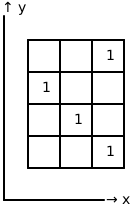
- type grid_size:
- param grid_size:
Number of cells in the grid as (n_rows, n_cols)
- type cell_size:
- param cell_size:
Physical size of each cell as (width, height) in world units
- type offset:
- param offset:
Position of the grid origin (0,0) in world coordinates
- type rotation:
float, default:0.0- param rotation:
Rotation angle of the grid in radians, counter-clockwise
- _grid
- Type:
Boolean array representing occupied (True) and free (False) cells
- _cell_size
- Type:
Physical dimensions of each cell
- _offset
- Type:
World coordinates of the grid origin
- _cos
- Type:
Cosine of the rotation angle (cached for efficiency)
- _sin
- Type:
Sine of the rotation angle (cached for efficiency)
Examples
Create a simple grid:
>>> from symaware.simulators.carla import GridMap
>>> grid = GridMap(grid_size=(10, 10), cell_size=(1.0, 1.0))
>>> grid.add_pos((5.5, 5.5))  # Mark cell containing position (5.5, 5.5) as occupied
Create a rotated grid:
>>> from symaware.simulators.carla import GridMap
>>> grid = GridMap(
...     grid_size=(10, 10),
...     cell_size=(2.0, 2.0),
...     offset=(100.0, 100.0),
...     rotation=np.pi/4  # 45 degrees
... )
See also
GridAbstractionA more complex grid-based abstraction with MDP
- _LOGGER = <Logger symaware.simulators.carla.GridMap (WARNING)>
- cell_to_pos(cell, mode='default')[source]
Convert grid cell coordinates to continuous world position.
This method applies the full geometric transformation: 1. Scale: Multiply cell indices by cell_size 2. Rotate: Apply rotation matrix 3. Translate: Add offset
Transformation Diagram:
Grid Space → Scale back → Rotate → Offset → World Space
- Parameters:
- Returns:
Examples
>>> from symaware.simulators.carla import GridMap
>>> grid = GridMap((10, 10), (1.0, 1.0), offset=(0, 0))
>>> grid.cell_to_pos((5, 5))  # Center of cell (5,5)
(5.5, 5.5)
>>> grid.cell_to_pos((5, 5), mode="lower-left-corner")
(5.0, 5.0)
- compute_paths(start, targets, use_8_connectivity=True)[source]
Compute all shortest paths from a starting cell to a list of target cells.
This method treats the occupied cells in the grid as nodes in a graph, where adjacent cells are connected. It uses networkx to find all simple paths between start and each target. Target nodes are guaranteed to have no edges connecting them, even if they are adjacent.
Graph Structure:
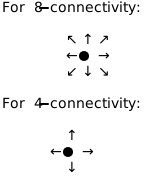
- Parameters:
- Returns:
dict[tuple[int,int],list[list[tuple[int,int]]]] – List of paths, where each path is a list of cells from start to target.
Examples
>>> from symaware.simulators.carla import GridMap
>>> grid = GridMap((10, 10), (1.0, 1.0))
>>> grid.add_cell_range(0, 10, 0, 10)
>>> paths = grid.compute_paths((0, 0), [(5, 5), (7, 7)])
Notes
Only occupied cells are considered as valid nodes in the graph
Target nodes will never have edges between them, ensuring path independence
- compute_paths_pos(start, targets, use_8_connectivity=True)[source]
Compute all possible paths from a starting position to a target position.
This is a convenience wrapper around compute_paths that accepts positions instead of cell indices.
- Parameters:
start_pos – Starting position as (x, y) coordinates
target_pos – Target position as (x, y) coordinates
use_8_connectivity (
bool, default:True) – If True, uses 8-connectivity (includes diagonals). If False, uses 4-connectivity. Default is True (King’s move pattern).
- Returns:
list[list[tuple[float,float]]] – List of paths, where each path is a list of positions (x, y) from start to target. Returns empty list if no path exists or if start/target are not in occupied cells.
Examples
>>> from symaware.simulators.carla import GridMap
>>> grid = GridMap((10, 10), (1.0, 1.0))
>>> grid.add_cell_range(0, 10, 0, 10)
>>> paths = grid.compute_paths_pos((0.5, 0.5), (5.5, 5.5))
>>> print(f"Found {len(paths)} paths")
Found 1 paths
- classmethod from_bounds(lb, ub, cell_size, rotation=0.0)[source]
Create a GridMap from lower and upper bound positions from world coordinates.
This factory method automatically calculates the required grid size to cover the rectangular region from lb to ub when rotated.
Geometry:
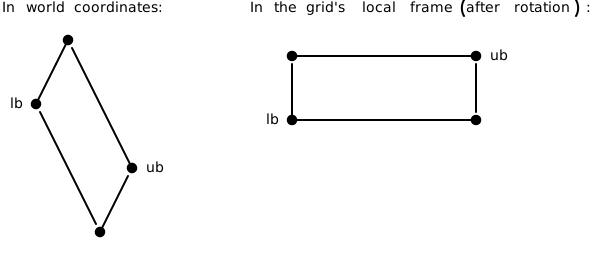
Grid size is computed to cover the rotated bounding box.
- Parameters:
- Returns:
A new GridMap instance covering the specified bounds
Examples
>>> from symaware.simulators.carla import GridMap
>>> grid = GridMap.from_bounds(
...     lb=(0.0, 0.0),
...     ub=(10.0, 20.0),
...     cell_size=(1.0, 1.0)
... )
- classmethod from_corner(corner, map_size, cell_size, rotation=0.0)[source]
Create a GridMap from a corner position (world coordinate) and map dimensions (world units).
This is useful when you know the physical size of the area you want to cover.
Geometry:
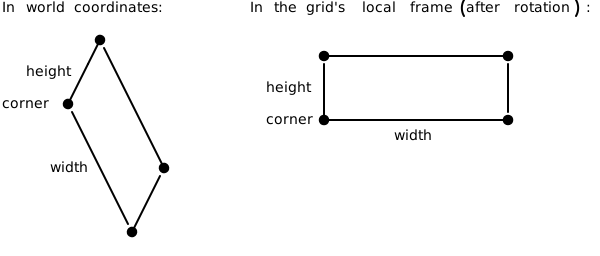
- Parameters:
corner (
tuple[float,float]) – Position of the grid origin (lower-left corner) in world coordinatesmap_size (
tuple[float,float]) – Physical dimensions of the map as (width, height)cell_size (
tuple[float,float]) – Size of each grid cell as (width, height)rotation (
float, default:0.0) – Rotation angle in radians
- Returns:
A new GridMap instance with the specified dimensions
Examples
>>> from symaware.simulators.carla import GridMap
>>> grid = GridMap.from_corner(
...     corner=(100.0, 100.0),
...     map_size=(50.0, 50.0),
...     cell_size=(1.0, 1.0),
...     rotation=np.pi/4
... )
- plot_grid(ax=None)[source]
Plot the grid in its native discrete space (row-column view).
This shows the grid as a matrix where: - X-axis represents rows - Y-axis represents columns - Black cells are occupied (True) - White cells are free (False)
Grid Visualization:

- Returns:
tuple[Figure,Axes] – Matplotlib figure and axes objects
- plot_grid_projection(points=None, point_color='green', point_marker='o', point_size=50, ax=None)[source]
Plot the grid projected into continuous world space.
This visualization shows: - Occupied cells as red squares in their world positions - Grid boundary as a blue polygon - The effect of rotation and offset on the grid layout - Optional points in world coordinates
- Parameters:
- Returns:
tuple[Figure,Axes] – Matplotlib figure and axes objects, or None if no occupied cells
Notes
The marker size is proportional to cell_size to give an accurate representation of cell dimensions in world space.
- pos_to_cell(pos)[source]
Convert continuous world position to grid cell coordinates.
This method applies the inverse geometric transformation: 1. Translate: Subtract offset 2. Rotate: Apply inverse rotation matrix (transpose) 3. Scale: Divide by cell_size and floor
Inverse Transformation Diagram:
World Space → Remove offset → Rotate → Scale → Grid Space
- Parameters:
- Returns:
- Raises:
AssertionError – If the position is outside the grid bounds
Examples
>>> from symaware.simulators.carla import GridMap
>>> grid = GridMap((10, 10), (1.0, 1.0), offset=(0, 0))
>>> grid.pos_to_cell((5.7, 3.2))
(5, 3)
- remove_pos_range(lb, ub)[source]
Remove a range of cells from the grid based on world coordinate bounds.
- set_pos_range(lb, ub, value)[source]
Set a range of cells in the grid based on world coordinate bounds.
- visualize_paths(paths, start=None, targets=None)[source]
Visualize the computed paths on the grid.
- Parameters:
paths (
list[list[tuple[int,int]]]) – List of paths, where each path is a list of cells (row, col)start (
tuple[int,int] |None, default:None) – Starting cell to highlight. If None, uses first cell of first path.targets (
list[tuple[int,int]] |None, default:None) – Target cells to highlight. If None, infers from paths dict keys or last cells.
- Returns:
tuple[Figure,Axes] – Matplotlib figure and axes objects
- class symaware.simulators.carla.grid.PathsGridMap(grid_size, cell_size, paths=None, offset=None, rotation=0)[source]
Bases:
WaypointGridMap- property num_paths
- class symaware.simulators.carla.grid.WaypointGridMap(grid_size, cell_size, offset=None, rotation=0)[source]
Bases:
GridMap- cell_to_pos(cell, mode='default')[source]
Convert grid cell coordinates to continuous world position.
This method applies the full geometric transformation: 1. Scale: Multiply cell indices by cell_size 2. Rotate: Apply rotation matrix 3. Translate: Add offset
Transformation Diagram:
Grid Space → Scale back → Rotate → Offset → World Space
- Parameters:
- Returns:
Examples
>>> from symaware.simulators.carla import GridMap
>>> grid = GridMap((10, 10), (1.0, 1.0), offset=(0, 0))
>>> grid.cell_to_pos((5, 5))  # Center of cell (5,5)
(5.5, 5.5)
>>> grid.cell_to_pos((5, 5), mode="lower-left-corner")
(5.0, 5.0)
- plot_grid(ax=None)[source]
Plot the grid in its native discrete space (row-column view).
This shows the grid as a matrix where: - X-axis represents rows - Y-axis represents columns - Black cells are occupied (True) - White cells are free (False)
Grid Visualization:
- Returns:
tuple[Figure,Axes] – Matplotlib figure and axes objects
symaware.simulators.carla.ltl module
author Shuhao Qi
- class symaware.simulators.carla.ltl.DFA(states, alphabet, transitions, initial_state, sink_states, AP)[source]
Bases:
objectDeterministic Finite Automaton representation.
Represents a DFA with states, alphabet, transitions, and sink states. Used to encode Linear Temporal Logic (LTL) specifications.
- states
List of state indices in the DFA
- alphabet
List of alphabet symbols (atomic propositions)
- transitions
Dictionary mapping (state, symbol) to next state
- initial_state
The starting state of the DFA
- sink_states
List of accepting or sink states
- AP
List of atomic propositions
symaware.simulators.carla.mdp module
- class symaware.simulators.carla.mdp.LightMDP(num_states, initial_state, num_actions, transitions, labels=<factory>)[source]
Bases:
objectA lightweight Markov Decision Process (MDP) representation.
Uses integer indices for states and actions instead of hashable objects. Provides the same interface as MDP but with reduced memory overhead.
- Parameters:
num_states (
int) – Number of statesinitial_state (
int) – Index of the initial statenum_actions (
int) – Number of actionstransitions (
ndarray[double]) – 3D array of state transition probabilities accessible via state_from -> action -> state_tolabels (
tuple[str,...], default:<factory>) – Labels for the states. Auto-generated if not provided
- property actions: ndarray[int]
Get an array of all actions.
- Return type:
Array of action indices from 0 to num_actions-1
- get_trans_prob(state, action)[source]
Get the transition probability distribution for a given state and action.
- class symaware.simulators.carla.mdp.MDP(states, initial_state, actions, transitions, labels=<factory>)[source]
Bases:
Generic[_S,_A]A Markov Decision Process (MDP) representation.
Represents an MDP as a tuple (states, initial_state, actions, transitions). Supports accessing and manipulating transition probabilities and provides MDP composition via the @ operator.
- Parameters:
states (
Iterable[TypeVar(_S)]) – Collection of states. Can contain any hashable typeinitial_state (
TypeVar(_S)) – The initial stateactions (
Iterable[TypeVar(_A)]) – Collection of actions. Can contain any hashable typetransitions (
ndarray[double]) – 3D array of state transition probabilities accessible via state_from -> action -> state_tolabels (
tuple[str,...], default:<factory>) – Labels for the states. Auto-generated from states if not provided
- property action_idxs
Get an array of all action indices.
- Return type:
Array of action indices from 0 to len(actions)-1
- get_trans_prob(state, action)[source]
Get the transition probability distribution for a given state and action.
- get_trans_prob_idx(state_idx, action_idx)[source]
Get the transition probability distribution for a given state and action using indices.
- initial_state: _S
- property state_idxs
Get an array of all state indices.
- Return type:
Array of state indices from 0 to len(states)-1
symaware.simulators.carla.path_planner module
author Shuhao Qi
- class symaware.simulators.carla.path_planner.PathPlanner(agent_id, world, async_loop_lock=None)[source]
Bases:
ComponentPath planning component for vehicle navigation in CARLA.
Computes safe and feasible paths for vehicles considering lane changes, junctions, and stopping scenarios. Uses spline-based path generation with behavioral state management.
- _compute()[source]
This very generic method is to be implemented by the specialised components. Given the state of the agent, compute a value or a set of values. Those values can be used to update the agent’s state or to compute the control input of the agent.
This method must be implemented in any custom component.
Example
The
compute()method can be implemented to perform some custom computation.>>> import numpy as np >>> from symaware.base import Component >>> class MyComponent(Component): ... def _compute(self): ... state = self._agent.self_state ... risk = self._agent.self_awareness.risk.get(0, np.zeros(1)) ... return state * np.maximum(0, risk)
- Parameters:
args – Additional arguments
kwargs – Additional keyword arguments
- Returns:
Computed value or set of values
- _update(args)[source]
This very generic method is to be implemented by the specialised components. Update the agent with some new values, usually computed by the
compute()method.This method must be implemented in any custom component.
Example
The
update()method can be implemented to perform some custom updates.>>> import numpy as np >>> from symaware.base import Component, TimeSeries >>> class MyComponent(Component): ... def _update(self, new_risk: TimeSeries, new_state: np.ndarray): ... self._agent.self_awareness.risk = new_risk ... self._agent.self_state = new_state
- initialise_component(agent, initial_awareness_database, initial_knowledge_database)[source]
Initialize the component with some custom logic. For example you can instantiate new attributes and properties of the component. This function is called upon initialization by the
Agent. To get the agent’s initial awareness and knowledge database you can use the arguments of this function. Make sure to call the super method at the end of your implementation to notify the subscribers of the event.Note
Invoking this method will notify the subscribers of the event
initialisedadded withadd_on_initialised().Warning
The implementation of the method in
Componentnotifies the subscribers of the eventinitialised, sets the attribute_agentto the agent passed as argument and the flag_initialisedtoTrue. If you override this method, make sure to call the super method at the end of your implementation.Example
The
initialise_component()method can be overwritten to provide some custom initialisation logic.>>> import time >>> import numpy as np >>> from symaware.base import Component >>> class MyComponent(Component): ... def initialise_component( ... self, agent, initial_awareness_database, initial_knowledge_database ... ): ... self._my_model = agent.entity.model ... self._my_state = initial_awareness_database[self.agent_id].state ... self._my_time = time.time() ... self._my_list = [] ... super().initialise_component(entity, initial_awareness_database, initial_knowledge_database)
- Parameters:
agent – Agent this component has been attached to
initial_awareness_database – Awareness database of the agent
initial_knowledge_database – Knowledge database of the agent
- class symaware.simulators.carla.path_planner.Status(*values)[source]
Bases:
EnumEnumeration of path planning statuses.
Defines possible states during path planning: following lane, lane changing, and stopping scenarios.
- FOLLOWING = 0
- LANE_CHANGING_L = 2
- LANE_CHANGING_R = 4
- START_LANE_CHANGE_L = 1
- START_LANE_CHANGE_R = 3
- STOPPING = 5
symaware.simulators.carla.perception module
author Shuhao Qi
- class symaware.simulators.carla.perception.FeatureExtractor(agent_id, environment, async_loop_lock=None)[source]
Bases:
PerceptionSystemExtracts features and observations from the CARLA environment.
Perceives vehicle states, lane information, traffic lights, and nearby vehicles to build a comprehensive observation of the driving environment.
- _compute()[source]
Compute the information perceived by the agent. It returns the values collected from the environment.
- Returns:
dict[int,FeatureObservation] – Information perceived by the agent. Each agent’s state is identified by its id.
- _update(perceived_information)[source]
Update the agent’s model with the new perceived information.
Example
A new perception system could decide to override the default
_update()method.>>> from symaware.base import PerceptionSystem, StateObservation, Identifier >>> class MyPerceptionSystem(PerceptionSystem): ... def _update(self, perceived_information: "dict[Identifier, StateObservation]"): ... # Your implementation here ... # Example: ... # Simply override the state of the agent ... self._agent.awareness_database[self._agent_id].state = perceived_information[self._agent_id].state
- Parameters:
perceived_information (
dict[int,FeatureObservation]) – Information perceived by the agent. Each agent’s state is identified by its id.
- class symaware.simulators.carla.perception.FeatureObservation(observed_object_id, cur_lane=None, is_junction=False, current_wp=<factory>, all_wp=<factory>, wp_list=<factory>, lane_width=0.0, junction_lane=None, lead_car=None)[source]
Bases:
ObservationObservation class for the FeatureExt system.
- Parameters:
observed_object_id – id of the agent that is the subject of the observation
state – state of the observed agent
symaware.simulators.carla.risk module
author Shuhao Qi
- class symaware.simulators.carla.risk.Product(MDP, DFA_cs, DFA_safe)[source]
Bases:
Generic[_S,_A]The product MDP of $mathcal{M}$, $A_{cs}$ and $A_s$ is defined as a tuple $P = (Z, z_0, A, hat{T}, G, D)$, with the state set
\[Z \coloneq S \times Q_{cs} \times Q_s A \coloneq \text{action set} z_0 \coloneq (\bar{s}_0, \delta_{cs}(q^0_{cs}, \mathcal{L}(s_0)_cs, \delta_s(q^0_s, L(\bar{s}_0))) \hat{T} \coloneq Z \times A \times Z \to [0,1]\]- Parameters:
- class symaware.simulators.carla.risk.RiskLTL(abs_model, MDP_sys, MDP_env=LightMDP(num_states=0, initial_state=0, num_actions=0, transitions=array([], shape=(0, 0, 0), dtype=float64), labels=()), DFA_safe=DFA(states=[], alphabet=[], transitions={}, initial_state=0, sink_states=[], AP=[]), DFA_sc=DFA(states=[], alphabet=[], transitions={}, initial_state=0, sink_states=[], AP=[]), cost_func=None)[source]
Bases:
objectRisk-aware controller using LTL specifications and a Markov Decision Process.
Solves the problem of finding a policy that satisfies LTL specifications while minimizing cost using a product automaton and Linear Programming.
- property cost_map
- property product
- class symaware.simulators.carla.risk.VelocityLPRiskLTL(abs_model, DFA_safe, DFA_sc, cost_func=None)[source]
Bases:
RiskLTLVelocity-based LTL risk controller with Linear Programming solver.
Extends RiskLTL to handle velocity-based abstractions and provides efficient optimization using Gurobi Linear Programming.
- property abstraction: VelocityGridAbstraction
- property hash
- plot_policy(policy, subsample=1, ax=None)[source]
Create a 3D visualization of the policy showing state transitions.
This function plots the policy as a 3D vector field where: - X, Y axes represent spatial position - Z axis represents speed - Arrows show the transition from current state to next state based on the policy
- Parameters:
- Returns:
Matplotlib figure and 3D axes objects
- Returns:
tuple[Figure, Axes3D] –
symaware.simulators.carla.util module
Cubic Spline library on python
author Atsushi Sakai
usage: see test codes as below
license: MIT
- symaware.simulators.carla.util.bernstein_poly(n, i, t)[source]
Bernstein polynom. :type n:
int:param n: (int) polynom degree :type i:int:param i: (int) :type t:float:param t: (float)- Returns:
float– (float)
- symaware.simulators.carla.util.bezier(t, control_points)[source]
Return one point on the bezier curve. :type t: :param t: (float) number in [0, 1] :type control_points: :param control_points: (numpy array) :return: (numpy array) Coordinates of the point
- symaware.simulators.carla.util.bezier_derivatives_control_points(control_points, n_derivatives)[source]
Compute control points of the successive derivatives of a given bezier curve. A derivative of a bezier curve is a bezier curve. See https://pomax.github.io/bezierinfo/#derivatives for detailed explanations :type control_points: :param control_points: (numpy array) :type n_derivatives: :param n_derivatives: (int) e.g., n_derivatives=2 -> compute control points for first and second derivatives :return: ([numpy array])
- symaware.simulators.carla.util.branch_wp(wp, max_distance=80, distance_rate=1.4)[source]
Get all branching waypoints (including lane changes).
- symaware.simulators.carla.util.cal_angle(vec_1, vec_2)[source]
Calculate angle between two 2D vectors.
- symaware.simulators.carla.util.calc_curvature(dx, dy, ddx, ddy)[source]
Compute curvature at one point given first and second derivatives. :type dx: :param dx: (float) First derivative along x axis :type dy: :param dy: (float) :type ddx: :param ddx: (float) Second derivative along x axis :type ddy: :param ddy: (float) :return: (float)
- symaware.simulators.carla.util.calc_path(sx, sy, syaw, ex, ey, eyaw, offset, d_dist)[source]
Compute Bezier curve path from start to end position.
- Parameters:
sx (
float) – X-coordinate of the starting pointsy (
float) – Y-coordinate of the starting pointsyaw (
float) – Yaw angle at start (radians)ex (
float) – X-coordinate of the ending pointey (
float) – Y-coordinate of the ending pointeyaw (
float) – Yaw angle at the end (radians)offset (
float) – Control point offsetd_dist (
float) – Distance between points on the path
- Returns:
Tuple of (path_x, path_y) numpy arrays representing the bezier path
- symaware.simulators.carla.util.local_wp(wp, max_distance=50, distance_rate=1.4)[source]
Get waypoints ahead on the current lane.